Toyota Car Jump AI Video Trend
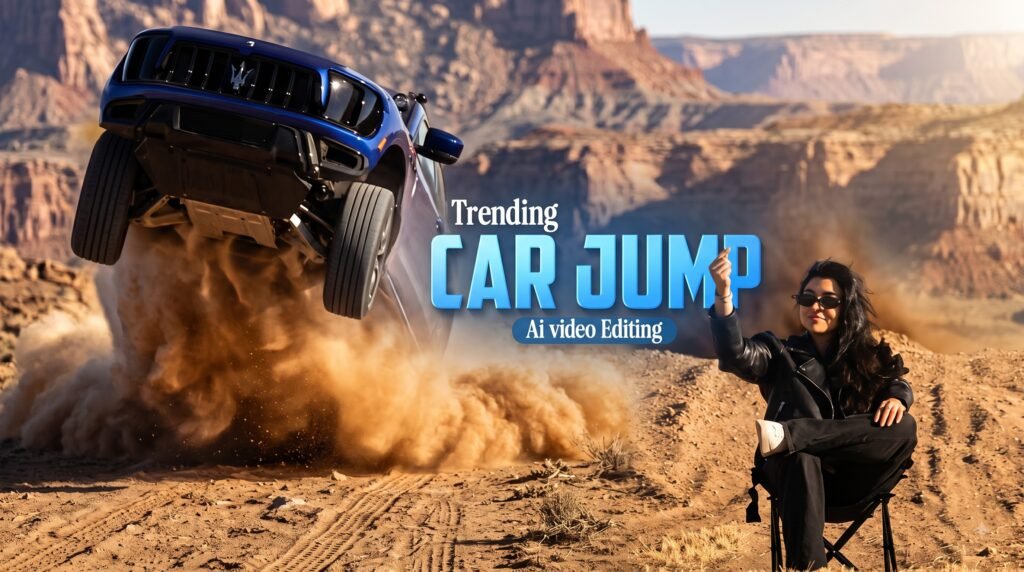
A new Toyota car jump AI video trend is becoming popular on Instagram and other social media platforms. The video shows a person sitting calmly on a chair while a Toyota Land Cruiser-style SUV appears to jump over a hill and fly above them.
The scene looks like a real movie stunt, but the effect can be created with AI.
You can make your own version using Google Flow, a suitable photo of yourself, a reference video, and a simple AI video prompt.
In this guide, you’ll learn how to create the Toyota car jump video, which settings to use, and how to improve the result if the first generation doesn’t look right.
Prompt to Make a Toyota Car Jump AI Video in Google Flow
Use this prompt to create the effect:
The prompt focuses on maintaining the person’s appearance while following the reference video’s camera movement, framing and action.
What Is the Toyota Car Jump AI Video Trend?
The Toyota car jump trend is an AI-generated video effect based on a reference clip.
In the original-style scene, a person sits on a chair in a desert-like environment. An SUV then comes over a hill and appears to jump directly above the person.
The person remains almost completely still while the vehicle moves through the scene.
AI video generation makes it possible to recreate the camera movement, environment and action using your own image.
Important: The vehicle stunt shown in the AI video should not be attempted in real life. The effect is created digitally.
What You Need to Create the Video
Before starting, prepare the following:
- A clear photo of yourself
- The Toyota car jump reference video
- The Toyota car jump AI video prompt
- A Google account
- Access to Google Flow
A good source image can make a noticeable difference to the final result, so choose a photo with a clear face and good lighting.
Toyota Car Jump Reference Video
The reference video helps the AI understand the scene, camera movement and overall action.
You can watch or download the reference clip here:
Toyota Car Jump Reference Video:
Watch or download the reference video
Save the video to your phone or computer before starting the generation process.
Free Toyota Car Jump AI Video Prompt
Follow these steps to create your own version.
1. Open Google Flow
Start by opening Google Flow and signing in with your Google account.
2. Upload the Reference Video
Upload the Toyota car jump reference video.
The reference video gives the AI information about the camera movement, composition and action you want to recreate.
3. Upload Your Photo
Next, add a clear photo of yourself.
For the best chance of getting a good result, use an image where your face and body are clearly visible.
A full-body photo can be particularly useful for scenes where the person needs to be placed sitting on a chair.
4. Add the AI Video Prompt
Copy the prompt provided below and paste it into the appropriate prompt field.
The prompt instructs the AI to follow the reference video’s movements while maintaining the appearance of the person in the uploaded image.
5. Use These Video Settings
For a similar Instagram Reel-style result, try:
| Setting | Recommended Option |
|---|---|
| Aspect Ratio | 9:16 Vertical |
| Model | Omni Flash |
| Duration | 10 seconds |
| Reference | Toyota car jump video |
| Input Image | Clear personal photo |
Settings and available models can change over time, so use the closest available options in your current Google Flow interface.
6. Generate the Video
After uploading the files and adding the prompt, click Generate.
The AI will process the reference material and create a new video based on your instructions.
If the first result isn’t perfect, don’t worry. AI video generation can require several attempts.
How to Get a Better Toyota Land Cruiser AI Video
Your source image can have a big impact on the final result. Try these tips if your video doesn’t look right.
Use a High-Quality Photo
Choose a sharp photo with good lighting. Avoid blurry images or photos where your face is hidden.
Use a Full-Body Image
A full-body photo can help when the AI needs to position you correctly on the chair.
Avoid Heavy Filters
Photos with strong beauty filters or extreme editing may make it harder for the AI to maintain your natural appearance.
Keep the Same Aspect Ratio
For Instagram Reels, use 9:16 vertical video. This gives you a format that fits the standard vertical Reel layout.
Try Multiple Generations
AI-generated videos can sometimes have issues with faces, hands, clothing or body positioning. If that happens, try generating the video again with a better source image.
Why Does the SUV Look Like a Toyota Land Cruiser?
The vehicle used in this type of AI trend resembles a Toyota Land Cruiser-style SUV.
The Land Cruiser is widely associated with off-road driving and rugged terrain, which makes the vehicle visually suitable for a desert or sand-dune scene.
However, the exact vehicle generated by an AI model may not always match the real-world model perfectly.
Can You Make This Video With Your Own Photo?
Yes. The basic idea is to provide a reference video showing the desired scene and an image that represents the person you want to appear in the generated video.
The AI then uses those inputs along with your instructions to generate a new clip.
Results can vary depending on the quality of the input image, reference video and AI model.
Is the Toyota Car Jump Video Real?
The version created with Google Flow is an AI-generated video.
Although the final result can look realistic, the car jump effect does not mean that a real vehicle was actually driven over the person.
Never attempt to recreate the stunt with a real car or SUV.
Toyota Car Jump AI Video FAQs
What is the Toyota car jump AI video?
It is an AI-generated video trend in which a person sits calmly while a Toyota Land Cruiser-style SUV appears to jump over them.
How can I make the Toyota car jump video?
You can create a similar effect using Google Flow, a reference video, your own photo and an appropriate AI video prompt.
What photo should I use for the Toyota AI video?
Use a clear, sharp and well-lit photo. A full-body image can be useful when the generated scene requires you to sit on a chair.
What aspect ratio should I use?
For Instagram Reels, 9:16 vertical is the recommended format for this type of video.
How long should the video be?
A 10-second video works well for recreating a short social-media clip, although the available duration options may depend on the current AI video tool.
Why doesn’t my face look correct?
AI video models may sometimes change facial features or other details. Try using a clearer source photo and generating the video again.
Can I use the video on Instagram?
You can use the generated video for social media, but you should review the applicable terms of the AI service and any rights associated with the reference material before publishing.
Is the car jump safe to recreate?
No. The car jump shown in the trend should be treated as an AI effect. Do not attempt the stunt with a real vehicle.
Final Words
The Toyota car jump AI video trend is a simple example of how AI video generation can turn an ordinary photo into a cinematic social-media clip.
With a clear photo, a suitable reference video and the right prompt, you can experiment with creating your own version in Google Flow.
Remember that AI-generated results can vary, so don’t be discouraged if your first attempt isn’t perfect. Try a different photo, adjust your instructions and generate another version.
If you’re experimenting with more AI video trends, you can also explore other creative prompts such as Toyota car jump videos and aircraft backflip-style AI videos.
Toyota Car Jump AI Video Trend
A new Toyota car jump AI video trend is becoming popular on Instagram and other social media platforms. The video shows a person sitting calmly on a chair while a Toyota Land Cruiser-style SUV appears to jump over a hill and fly above them.
The scene looks like a real movie stunt, but the effect can be created with AI.
You can make your own version using Google Flow, a suitable photo of yourself, a reference video, and a simple AI video prompt.
In this guide, you’ll learn how to create the Toyota car jump video, which settings to use, and how to improve the result if the first generation doesn’t look right.
What Is the Toyota Car Jump AI Video Trend?
The Toyota car jump trend is an AI-generated video effect based on a reference clip.
In the original-style scene, a person sits on a chair in a desert-like environment. An SUV then comes over a hill and appears to jump directly above the person.
The person remains almost completely still while the vehicle moves through the scene.
AI video generation makes it possible to recreate the camera movement, environment and action using your own image.
Important: The vehicle stunt shown in the AI video should not be attempted in real life. The effect is created digitally.
What You Need to Create the Video
Before starting, prepare the following:
- A clear photo of yourself
- The Toyota car jump reference video
- The Toyota car jump AI video prompt
- A Google account
- Access to Google Flow
A good source image can make a noticeable difference to the final result, so choose a photo with a clear face and good lighting.
Toyota Car Jump Reference Video
The reference video helps the AI understand the scene, camera movement and overall action.
You can watch or download the reference clip here:
Toyota Car Jump Reference Video:
Watch or download the reference video
Save the video to your phone or computer before starting the generation process.
How to Make a Toyota Car Jump AI Video in Google Flow
Follow these steps to create your own version.
1. Open Google Flow
Start by opening Google Flow and signing in with your Google account.
2. Upload the Reference Video
Upload the Toyota car jump reference video.
The reference video gives the AI information about the camera movement, composition and action you want to recreate.
3. Upload Your Photo
Next, add a clear photo of yourself.
For the best chance of getting a good result, use an image where your face and body are clearly visible.
A full-body photo can be particularly useful for scenes where the person needs to be placed sitting on a chair.
4. Add the AI Video Prompt
Copy the prompt provided below and paste it into the appropriate prompt field.
The prompt instructs the AI to follow the reference video’s movements while maintaining the appearance of the person in the uploaded image.
5. Use These Video Settings
For a similar Instagram Reel-style result, try:
| Setting | Recommended Option |
|---|---|
| Aspect Ratio | 9:16 Vertical |
| Model | Omni Flash |
| Duration | 10 seconds |
| Reference | Toyota car jump video |
| Input Image | Clear personal photo |
Settings and available models can change over time, so use the closest available options in your current Google Flow interface.
6. Generate the Video
After uploading the files and adding the prompt, click Generate.
The AI will process the reference material and create a new video based on your instructions.
If the first result isn’t perfect, don’t worry. AI video generation can require several attempts.
Free Toyota Car Jump AI Video Prompt
Use this prompt to create the effect:
Track the exact camera movement, framing, facial expressions, and body movements from the video. Keep the face, hairstyle, body, clothing, and overall appearance exactly the same as in the reference image, with no changes or distortion. Use the video’s background and environment. Output in 9:16 vertical format.
The prompt focuses on maintaining the person’s appearance while following the reference video’s camera movement, framing, and action.
How to Get a Better Toyota Land Cruiser AI Video
Your source image can have a big impact on the final result. Try these tips if your video doesn’t look right.
Use a High-Quality Photo
Choose a sharp photo with good lighting. Avoid blurry images or photos where your face is hidden.
Use a Full-Body Image
A full-body photo can help when the AI needs to position you correctly on the chair.
Avoid Heavy Filters
Photos with strong beauty filters or extreme editing may make it harder for the AI to maintain your natural appearance.
Keep the Same Aspect Ratio
For Instagram Reels, use 9:16 vertical video. This gives you a format that fits the standard vertical Reel layout.
Try Multiple Generations
AI-generated videos can sometimes have issues with faces, hands, clothing or body positioning. If that happens, try generating the video again with a better source image.
Why Does the SUV Look Like a Toyota Land Cruiser?
The vehicle used in this type of AI trend resembles a Toyota Land Cruiser-style SUV.
The Land Cruiser is widely associated with off-road driving and rugged terrain, which makes the vehicle visually suitable for a desert or sand-dune scene.
However, the exact vehicle generated by an AI model may not always match the real-world model perfectly.
Can You Make This Video With Your Own Photo?
Yes. The basic idea is to provide a reference video showing the desired scene and an image that represents the person you want to appear in the generated video.
The AI then uses those inputs along with your instructions to generate a new clip.
Results can vary depending on the quality of the input image, reference video and AI model.
Is the Toyota Car Jump Video Real?
The version created with Google Flow is an AI-generated video.
Although the final result can look realistic, the car jump effect does not mean that a real vehicle was actually driven over the person.
Never attempt to recreate the stunt with a real car or SUV.
Toyota Car Jump AI Video FAQs
What is the Toyota car jump AI video?
It is an AI-generated video trend in which a person sits calmly while a Toyota Land Cruiser-style SUV appears to jump over them.
How can I make the Toyota car jump video?
You can create a similar effect using Google Flow, a reference video, your own photo and an appropriate AI video prompt.
What photo should I use for the Toyota AI video?
Use a clear, sharp and well-lit photo. A full-body image can be useful when the generated scene requires you to sit on a chair.
What aspect ratio should I use?
For Instagram Reels, 9:16 vertical is the recommended format for this type of video.
How long should the video be?
A 10-second video works well for recreating a short social-media clip, although the available duration options may depend on the current AI video tool.
Why doesn’t my face look correct?
AI video models may sometimes change facial features or other details. Try using a clearer source photo and generating the video again.
Can I use the video on Instagram?
You can use the generated video for social media, but you should review the applicable terms of the AI service and any rights associated with the reference material before publishing.
Is the car jump safe to recreate?
No. The car jump shown in the trend should be treated as an AI effect. Do not attempt the stunt with a real vehicle.
Final Words
The Toyota car jump AI video trend is a simple example of how AI video generation can turn an ordinary photo into a cinematic social-media clip.
With a clear photo, a suitable reference video and the right prompt, you can experiment with creating your own version in Google Flow.
Remember that AI-generated results can vary, so don’t be discouraged if your first attempt isn’t perfect. Try a different photo, adjust your instructions and generate another version.
If you’re experimenting with more AI video trends, you can also explore other creative prompts such as Toyota car jump videos and aircraft backflip-style AI videos.

Decoding viral trends in tech, videos, and web culture—transforming data into growth strategies. 🚀 Helping creators ride the next digital wave with actionable insights.